
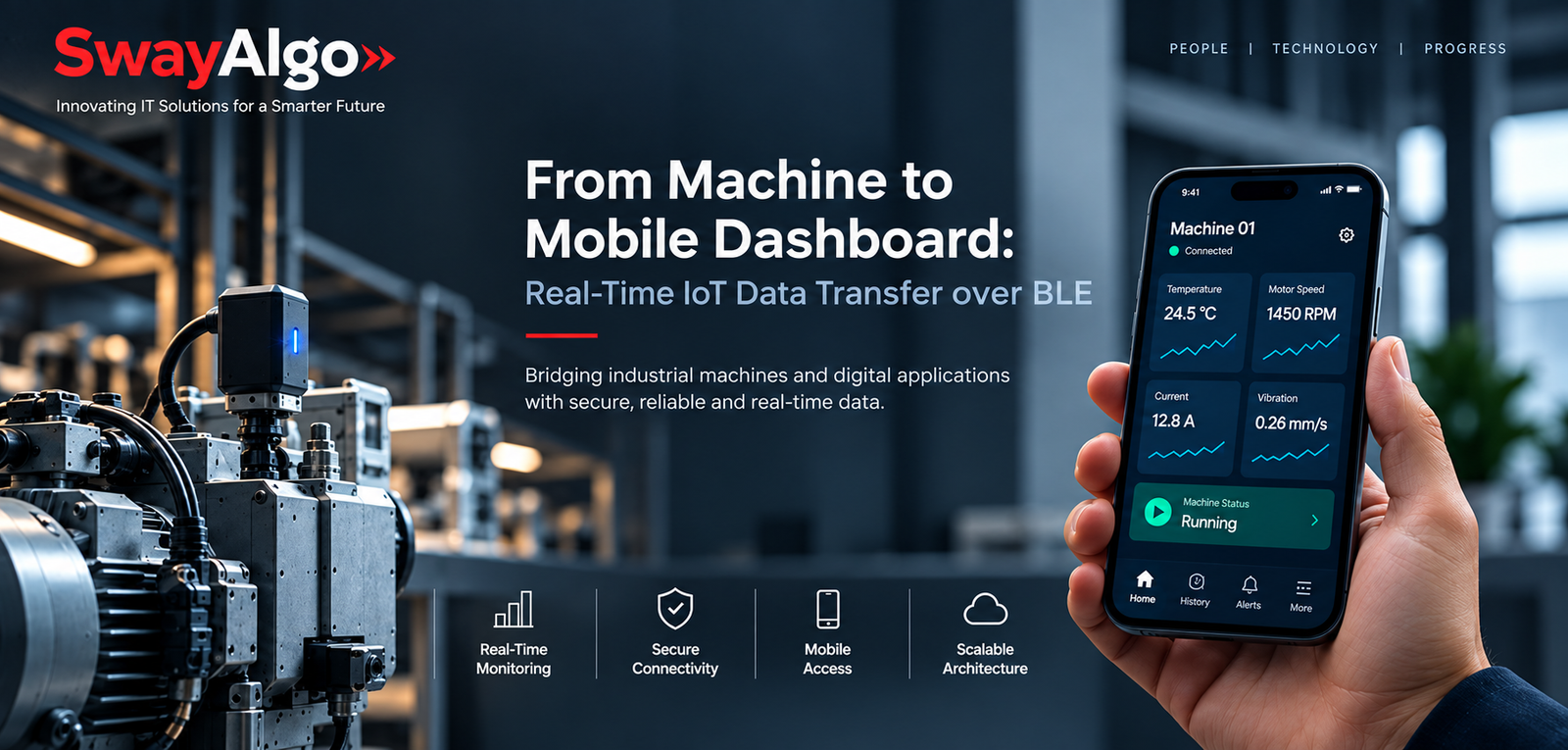
1. Introduction Industrial machines continuously generate valuable data—temperature, voltage, current, RPM, pressure, vibration, machine status and fault information. Traditionally, this information remained within the machine or was available only through a local control panel. IoT makes it possible to bring this machine data into software systems, allowing operators and engineers to monitor equipment in real time. One practical approach is to use Bluetooth Low Energy (BLE) as the communication layer between an IoT controller installed on the machine and a mobile application. In this architecture, the machine collects telemetry through sensors, the controller processes it, BLE transfers the data and a React Native application converts that data into a real-time dashboard. Machine → IoT Controller → BLE → React Native App → Dashboard 2. From Machine Signals to Telemetry Every IoT system starts with the physical machine. Before any data reaches a mobile application or cloud platform, the machine must first sense what is happening in the real world. Parameters such as temperature, motor speed, current, voltage, pressure, vibration and machine state are captured using appropriate industrial sensors. 2.1 Sensor Layer Sensors convert a physical measurement into an electrical signal. Depending on the sensor and machine, this can be: Analog signals — voltage or current, such as 0–10 V or 4–20 mA Digital signals — ON/OFF, pulse or frequency-based signals Communication-based sensors — CAN, Modbus/RS-485, I²C, SPI, etc. The choice depends on the machine architecture, required accuracy, environmental conditions, cable distance and industrial standards. 2.2 Controller / Edge Layer The embedded controller acts as the edge-processing layer between the machine and the digital application. Controllers such as ESP32, STM32 and Nordic nRF52 can acquire data from multiple sensors and process it locally before any information is transmitted over BLE. The firmware is responsible for converting raw electrical signals into reliable engineering measurements. This typically includes signal acquisition, filtering, calibration, unit conversion, range validation and machine-state evaluation. Processing the data at the edge reduces unnecessary communication and ensures that the mobile application receives meaningful values rather than raw sensor signals. For example, a temperature sensor may provide an analog signal that is sampled through the controller’s ADC. After applying the sensor’s calibration parameters and filtering noise, the firmware may report the resulting measurement as 72.4 °C. Similarly, a motor-speed sensor may generate pulses proportional to shaft rotation; the firmware calculates the pulse frequency and converts it into an engineering value such as 1,450 RPM. This edge-processing approach establishes a clear separation of responsibilities: the machine and controller handle measurement and real-time processing, while the BLE and application layers handle communication, visualization and user interaction. Sensor Input Controller Processing Output Value Unit Validation Rule Temperature sensor / ADC ADC conversion → calibration → noise filtering 72.4 °C -40 to 150°C Motor-speed pulse signal Pulse measurement → frequency calculation → RPM conversion 1,450 RPM 0–6,000 RPM 3. Why BLE for Industrial IoT? BLE uses the GATT (Generic Attribute Profile) architecture and provides a practical communication layer when a mobile device needs to communicate directly with a nearby machine. a practical communication layer when a mobile device needs to communicate directly with a nearby machine. It is especially suitable for industrial telemetry because machine data is typically small, structured and periodically updated rather than a continuous high-bandwidth stream. Features Bluetooth Classic Bluetooth Low Energy (BLE) Primary focus Continuous data / audio Sensors & telemetry Power consumption Higher Lower Data pattern Continuous streams Short, periodic data Typical use Audio, speakers, legacy devices IoT, sensors, machines Typical range ~10 m typical ~10–100+ m depending on PHY, power & environment Key Takeaway BLE is not the complete IoT system; it serves as the local communication layer between the machine and the mobile application. This makes it well suited for local monitoring, diagnostics, commissioning and machine configuration. 4. Connecting BLE with React Native The React Native application acts as the mobile interface between the machine and the operator. Using native BLE libraries, the app can discover nearby IoT devices, establish a GATT connection, subscribe to telemetry notifications and display machine data in real time. For production development, libraries such as react-native-ble-plx and react-native-ble-manager are commonly considered for BLE communication. Supporting libraries such as Zustand / Redux Toolkit can manage telemetry state, while MMKV / SQLite can be used when local or offline data storage is required. Scan → Discover Machine → Connect → Discover Services → Subscribe to Notifications → Receive Telemetry → Update Dashboard The BLE logic should remain separate from the UI. A dedicated BLE service can manage device communication, while a telemetry parser decodes incoming packets and the application state layer exposes validated data to the dashboard. 5. Designing the Telemetry Protocol A telemetry protocol defines the data contract between the embedded device and the software layer. It specifies how machine measurements are represented, encoded, transmitted, interpreted and validated, while remaining efficient for embedded hardware and extensible for mobile and cloud systems. Data Representation During development, a readable format such as JSON can be useful for testing and debugging: { “temperature”: 72.4, “rpm”: 1450, “current”: 12.8, “voltage”: 415, “machineStatus”: “RUNNING” } In production BLE systems, telemetry may use a compact binary payload to reduce packet size and communication overhead.The firmware and React Native application must agree on the data type, unit, scaling, byte order, field structure and timestamp semantics. Protocol Reliability A production protocol should also define how to handle missing, duplicated, invalid or corrupted data. Timestamps and sequence numbers help detect stale or out-of-order telemetry, while validation rules prevent abnormal values from being treated as valid machine data. A versioned telemetry contract allows the same data definition to remain consistent across the device, React Native app, backend and cloud, making the system easier to maintain and evolve as new machine parameters are introduced. 6. Real-Time Mobile Dashboard Once telemetry reaches the React Native application, the raw machine data is converted into operator-friendly information. The dashboard should focus on the machine’s current condition rather than simply displaying sensor values. A typical view may present
Beyond the Boilerplate: Building High-Performance Ecosystems with Supabase
Learn How to Create a Scalable Backend Using Supabase in This Easy Guide What is Supabase? The Open-Source Firebase Alternative In the world of app development, developers often face a choice: spend weeks building a custom backend or use a “Backend-as-a-Service” to launch quickly. For years, Google’s Firebase was the go-to choice. However, Supabase has emerged as the powerful, open-source alternative that gives you the speed of Firebase with the professional power of a relational database. In the traditional development lifecycle, the backend is often a bottleneck. Developers usually spend weeks designing schemas, writing boilerplate CRUD APIs, managing authentication logic and setting up real-time sockets. Feature Firebase Supabase Data Style NoSQL (Like a giant folder of documents) Relational (Like a smart spreadsheet/PostgreSQL) Lock-in High (Hard to move your data later) Low (It’s open-source; you own your data) Search Limited built-in search Advanced SQL search capabilities Scaling Can get very expensive quickly Predictable and efficient The Swayalgo Strategy: Rapid Development, Infinite Scale At Swayalgo, our strategy isn’t just about using a tool; it’s about compressing the infrastructure timeline. we choose Supabase because it doesn’t lock you into a single platform—it gives you full control over your data while handling the “boring” infrastructure for you When we build for our clients, we follow a specific “API-Less” framework: Database-First Architecture: We treat the PostgreSQL schema as the “Source of Truth.” By defining strict relational structures, we ensure data integrity from day one. Zero-Trust Security: We use Row Level Security (RLS) as our primary firewall. This allows the frontend to talk directly to the database securely, removing the need for an intermediate API gateway that can fail or lag. Edge-First Logic: For complex business rules (like calculating payments or sending emails), we use Supabase Edge Functions. This keeps logic global, fast and serverless. By following this strategy, we reduce backend development time by up to 60%, allowing our teams to focus on the frontend experience and business growth. The Supabase “Big Five” Features If you are new to Supabase, these are the five core tools you will use inside the dashboard: 1. The Database (Tables) Supabase is built on PostgreSQL. Unlike simple lists, these tables can “talk” to each other. For example, a “Customer” table can be linked to an “Orders” table, making it easy to organize complex business information. 2. Authentication (Users) Managing logins is a headache. Supabase Auth handles it all—from email/password signups to “Login with Google” or “Magic Links.” It ensures only the right people access your data. 3. Storage (Files) Need a place for profile pictures, PDFs, or videos? Supabase Storage lets you upload and serve large files securely. You can even set rules so users can only see their own private documents. 4. Edge Functions (Custom Logic) Sometimes you need to do something special, like sending a welcome email or processing a payment via Stripe. Edge Functions are small pieces of code that run “in the cloud” globally, making your app fast regardless of where your user is located. 5. Real-time (Live Updates) This is the “magic” feature. When data changes in your database, Supabase can tell your app to update instantly without the user needing to refresh the page. This is how chat apps and live dashboards work. Why Go “API-Less”? The “API-less” approach doesn’t mean there are no APIs; it means Supabase automatically generates them for you. Every time you create a table in your PostgreSQL database, Supabase instantly provides a RESTful and GraphQL API via PostgREST. Reduced Complexity: No need to maintain a separate Node.js or Python server. Security at Scale: Security logic is handled at the database level where the data lives. Faster Iteration: Frontend developers can query data directly using the Supabase SDK, making the workflow much more agile. Why is this Stack Growing? Supabase’s growth (reaching over 1.7 million developers in 2026) is driven by three main factors: The “Vibe Coding” Era: Popular AI coding tools like Cursor, v0 and Lovable use Supabase as their default backend because it’s the easiest to set up with AI prompts. No Vendor Lock-in: Because everything is open-source (Postgres, Go, Elixir), you can take your data and run it on your own servers anytime. This gives big companies “peace of mind.” The Developer Experience (DX): They took complex tools (like PostgreSQL) and gave them a “spreadsheet-like” interface that anyone can understand. Summary of Libraries Used If you are building an app, these are the libraries you will actually touch: supabase-js: The main library for web apps (React, Next.js, Vue). supabase-flutter: For high-performance mobile apps. postgrest-js: The engine that handles your data fetching. auth-js: The library that manages your user sessions. The Project Example: Scalable Task Management Let’s look at a standard project flow, such as a Collaborative Task Manager, to see how this works in practice. 1. The Database Foundation Instead of writing code to define your data structures, you use the Supabase Dashboard to create tables. For our task manager, we define a tasks table with columns for the name, status and the user’s ID. 2. Authentication Made Simple Supabase Auth handles the heavy lifting. Whether it’s Email/Password, Google or Magic Links, the system integrates directly with your database. When a user signs in, Supabase issues a JSON Web Token (JWT) that identifies them in every database request. Row Level Security (RLS) 3. Row Level Security (RLS): The Security Engine This is the most critical part of an API-less backend. Since there is no “middleman” API to check if a user is allowed to see data, we use RLS. You write simple SQL policies that act as a gatekeeper. Where is Supabase Used? Supabase is versatile enough for almost any project. At Swayalgo, we implement it for: SaaS Platforms: Subscription-based tools that need secure user accounts. E-commerce: Stores that need to manage inventory and customer orders accurately. Mobile Apps: Real-time apps that need to sync data between millions of devices. Internal Dashboards: High-speed tools for companies to manage their own data. Real-Time Capabilities Without WebSockets One of the hardest features to scale manually is real-time synchronization. With Supabase, you don’t need to manage Socket.io or Pusher. You simply “subscribe” to a table. The Workflow: The Trigger: A user updates a task on their mobile app.